The Ultimate Docker Cheat Sheet

A cheatsheet is a concise summary of important information that is meant to be used as a quick reference. Cheatsheets are often used in the form of a list or a table, and they typically cover a specific topic or subject area. In the context of Docker, a Docker cheatsheet is a summary of commonly used Docker commands and their options, as well as other useful information related to Docker.
Cheatsheets can be particularly helpful when learning a new tool or technology, as they provide a convenient way to quickly look up and remind oneself of key concepts and commands. They can also be useful for experienced users who need to recall a specific command or option but may not remember all the details.
Table of Contents
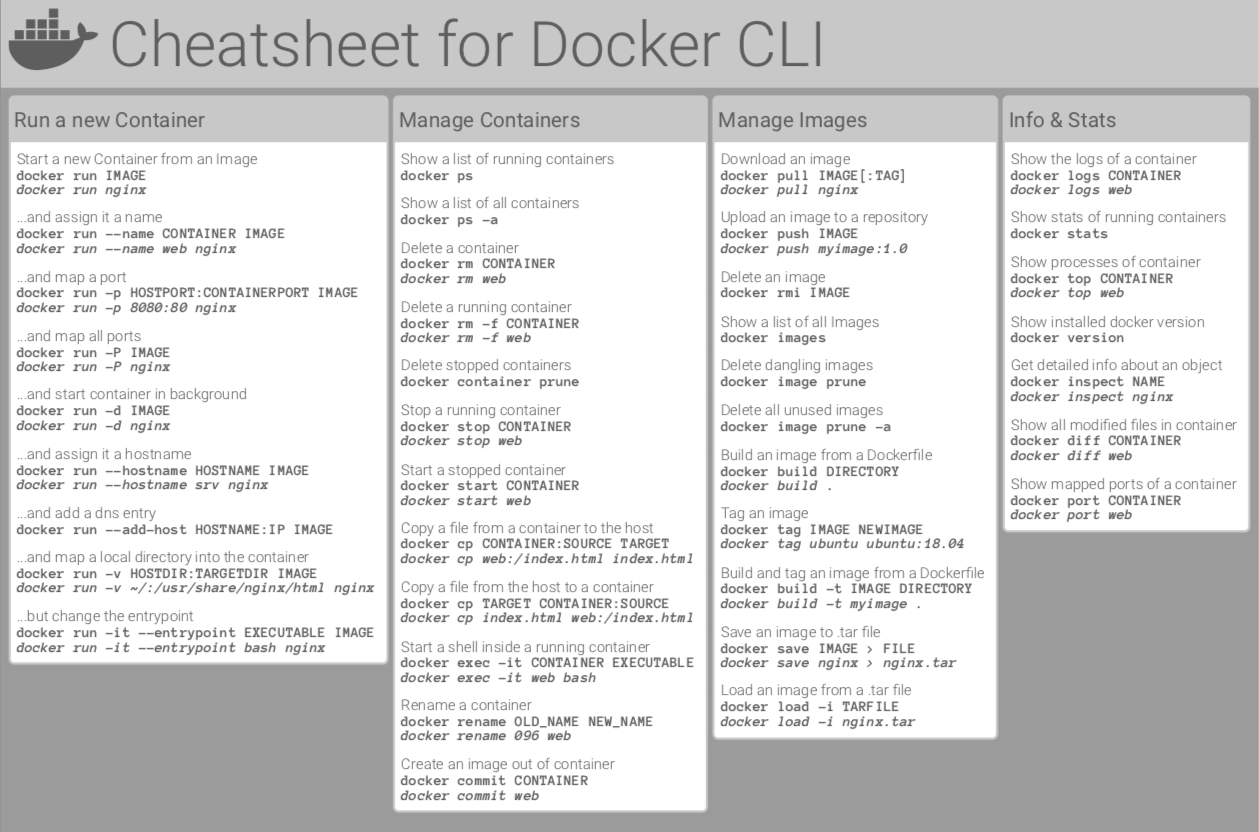
Basic Docker CLIs
Here's the list of the basic Docker commands that works on both Docker Desktop as well as Docker Engine:
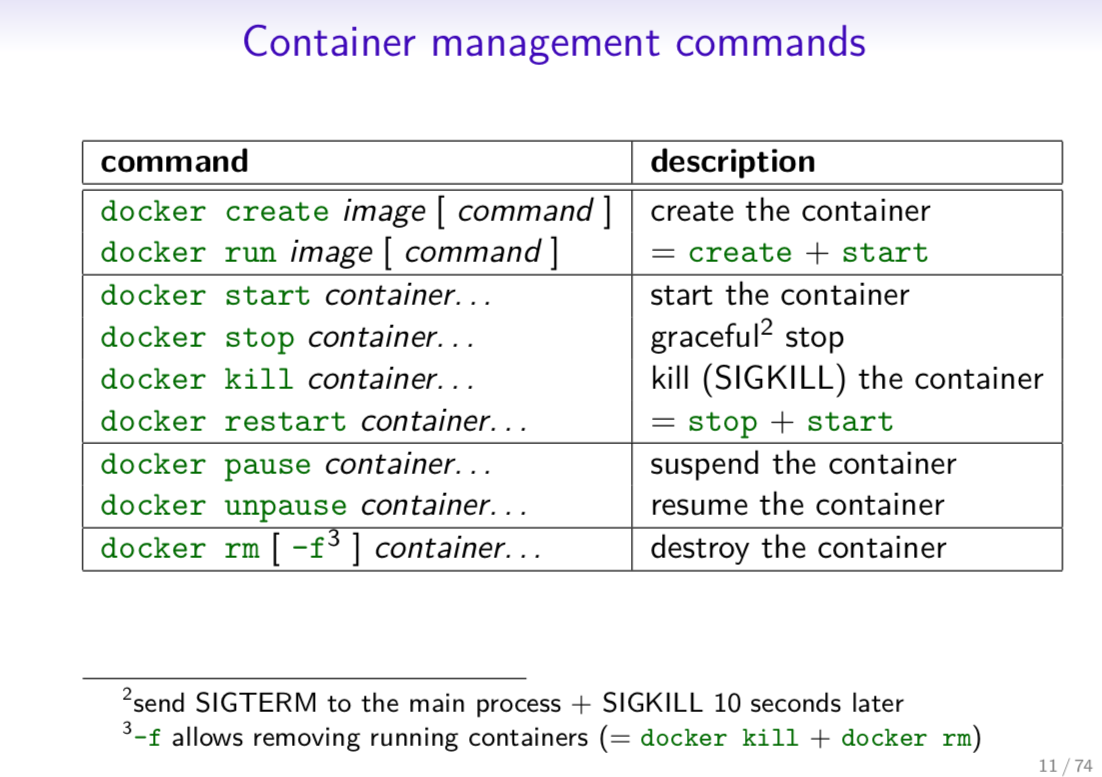
Container Management CLIs
Here's the list of the Docker commands that manages Docker images and containers flawlessly:
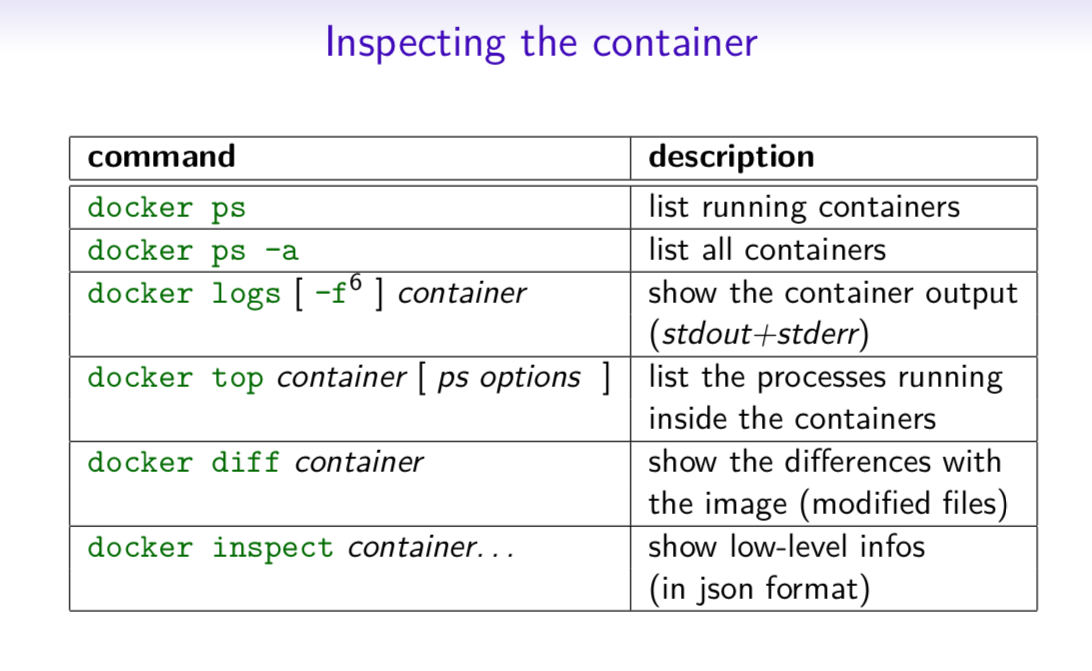
Inspecting The Container
Here's the list of the basic Docker commands that helps you inspect the containers seamlessly:
Interacting with Container
Do you want to know how to access the containers? Check out these fundamental commands:
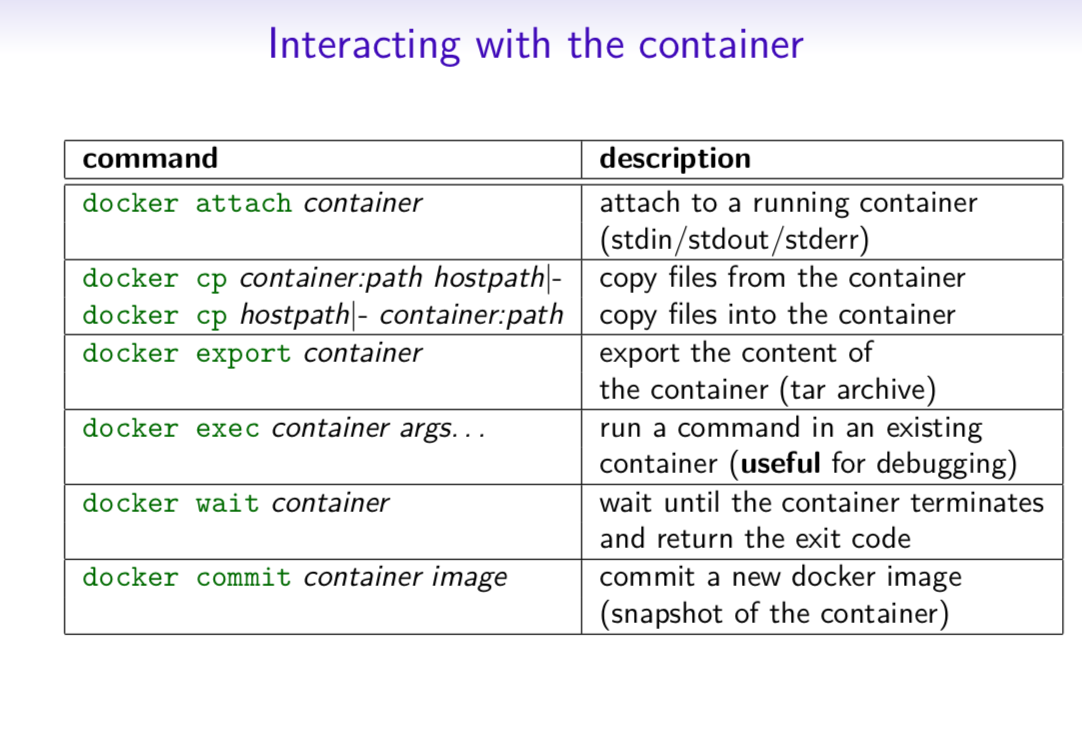
Image Management Commands
Here's the list of Docker commands that helps you manage the Docker Images:
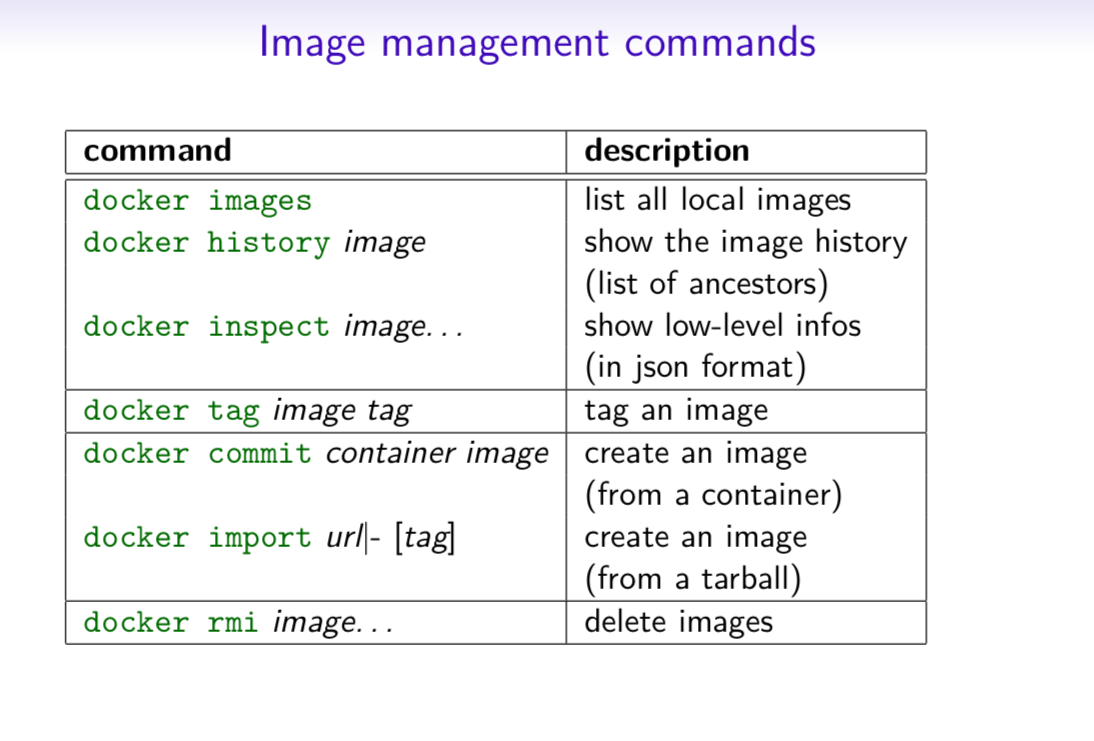
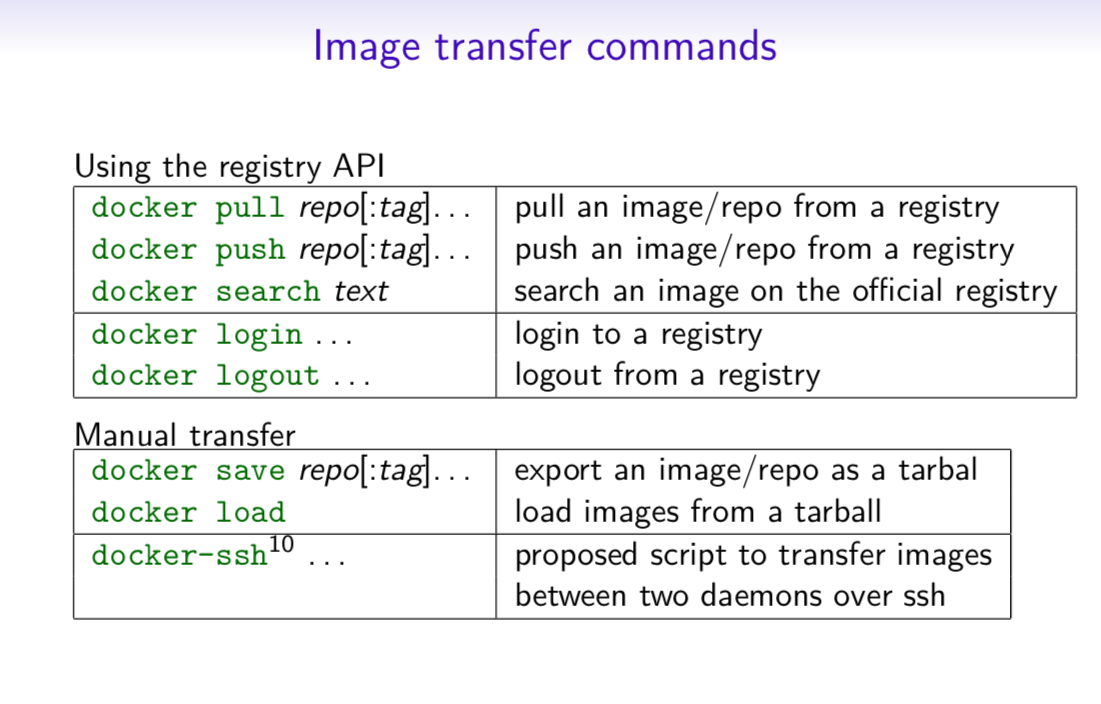
Image Transfer Commands
Here's the list of Docker image transfer commands:
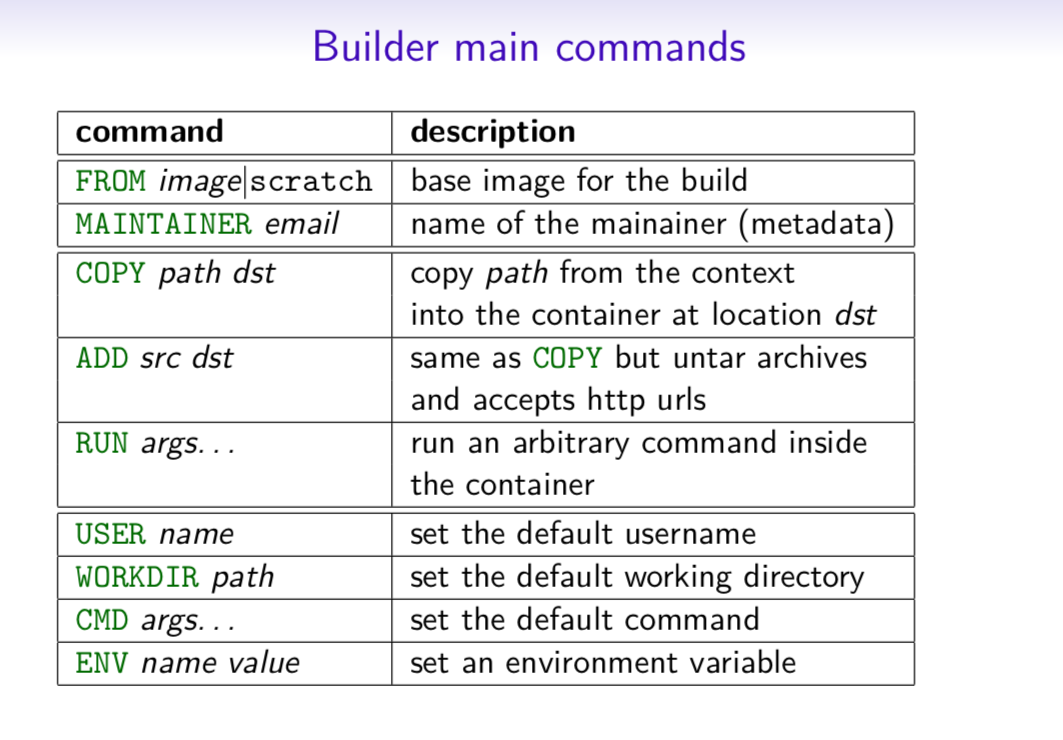
Builder Main Commands
Want to know how to build Docker Image? Do check out the list of Image Build Commands:
The Docker CLI
Manage images
docker build
docker build [options] .
  -t "app/container_name"    # name
Create an image from a Dockerfile.
docker run
docker run [options] IMAGE
  # see `docker create` for options
Run a command in an image.
Manage containers
docker create
docker create [options] IMAGE
  -a, --attach               # attach stdout/err
  -i, --interactive          # attach stdin (interactive)
  -t, --tty                  # pseudo-tty
      --name NAME            # name your image
  -p, --publish 5000:5000    # port map
      --expose 5432          # expose a port to linked containers
  -P, --publish-all          # publish all ports
      --link container:alias # linking
  -v, --volume `pwd`:/app    # mount (absolute paths needed)
  -e, --env NAME=hello       # env vars
Example
$ docker create --name app_redis_1 \
  --expose 6379 \
  redis:3.0.2
Create a container from an image.
docker exec
docker exec [options] CONTAINER COMMAND
  -d, --detach        # run in background
  -i, --interactive   # stdin
  -t, --tty           # interactive
Example
$ docker exec app_web_1 tail logs/development.log
$ docker exec -t -i app_web_1 rails c
Run commands in a container.
docker start
docker start [options] CONTAINER
  -a, --attach        # attach stdout/err
  -i, --interactive   # attach stdin

docker stop [options] CONTAINER
Start/stop a container.
docker ps
$ docker ps
$ docker ps -a
$ docker kill $ID
Manage containers using ps/kill.
Images
docker images
$ docker images
  REPOSITORY   TAG        ID
  ubuntu       12.10      b750fe78269d
  me/myapp     latest     7b2431a8d968
$ docker images -a # also show intermediate
Manages images.
docker rmi
docker rmi b750fe78269d
Deletes images.
Also see
- Getting Started (docker.io)
Dockerfile
Inheritance
FROM ruby:2.2.2
Variables
ENV APP_HOME /myapp
RUN mkdir $APP_HOME
Initialization
RUN bundle install
WORKDIR /myapp
VOLUME ["/data"]
# Specification for mount point
ADD file.xyz /file.xyz
COPY host_file.xyz /path/container_file.xyz
Onbuild
ONBUILD RUN bundle install
# when used with another file
Commands
EXPOSE 5900
CMD    ["bundle", "exec", "rails", "server"]
Entrypoint
ENTRYPOINT ["executable", "param1", "param2"]
ENTRYPOINT command param1 param2
Configures a container that will run as an executable.
ENTRYPOINT exec top -b
This will use shell processing to substitute shell variables, and will ignore any CMD or docker run command line arguments.
Metadata
LABEL version="1.0"
LABEL "com.example.vendor"="ACME Incorporated"
LABEL com.example.label-with-value="foo"
LABEL description="This text illustrates \
that label-values can span multiple lines."
See also
docker-compose
Basic example
# docker-compose.yml
version: '2'

services:
  web:
    build: .
    # build from Dockerfile
    context: ./Path
    dockerfile: Dockerfile
    ports:
     - "5000:5000"
    volumes:
     - .:/code
  redis:
    image: redis
Commands
docker-compose start
docker-compose stop
docker-compose pause
docker-compose unpause
docker-compose ps
docker-compose up
docker-compose down
Reference
{: .-three-column}
Building
web:
  # build from Dockerfile
  build: .
  # build from custom Dockerfile
  build:
    context: ./dir
    dockerfile: Dockerfile.dev
  # build from image
  image: ubuntu
  image: ubuntu:14.04
  image: tutum/influxdb
  image: example-registry:4000/postgresql
  image: a4bc65fd
Ports
  ports:
    - "3000"
    - "8000:80"  # guest:host
  # expose ports to linked services (not to host)
  expose: ["3000"]
Commands
  # command to execute
  command: bundle exec thin -p 3000
  command: [bundle, exec, thin, -p, 3000]
  # override the entrypoint
  entrypoint: /app/start.sh
  entrypoint: [php, -d, vendor/bin/phpunit]
Environment variables
  # environment vars
  environment:
    RACK_ENV: development
  environment:
    - RACK_ENV=development
  # environment vars from file
  env_file: .env
  env_file: [.env, .development.env]
Dependencies
  # makes the `db` service available as the hostname `database`
  # (implies depends_on)
  links:
    - db:database
    - redis
  # make sure `db` is alive before starting
  depends_on:
    - db
Other options
  # make this service extend another
  extends:
    file: common.yml  # optional
    service: webapp
  volumes:
    - /var/lib/mysql
    - ./_data:/var/lib/mysql
Advanced features
Labels
services:
  web:
    labels:
      com.example.description: "Accounting web app"
DNS servers
services:
  web:
    dns: 8.8.8.8
    dns:
      - 8.8.8.8
      - 8.8.4.4
Devices
services:
  web:
    devices:
    - "/dev/ttyUSB0:/dev/ttyUSB0"
External links
services:
  web:
    external_links:
      - redis_1
      - project_db_1:mysql
Hosts
services:
  web:
    extra_hosts:
      - "somehost:192.168.1.100"
services
To view list of all the services running in swarm
docker service ls
To see all running services
docker stack services stack_name
to see all services logs
docker service logs stack_name service_name
To scale services quickly across qualified node
docker service scale stack_name_service_name=replicas
clean up
To clean or prune unused (dangling) images
docker image prune
To remove all images which are not in use containers , add - a
docker image prune -a
To prune your entire system
docker system prune
To leave swarm
docker swarm leave
To remove swarm ( deletes all volume data and database info)
docker stack rm stack_name
To kill all running containers
docker kill $(docker ps -q )
Docker Security
Docker Scout
Command line tool for Docker Scout:
docker scout
Analyzes a software artifact for vulnerabilities
docker scout cves [OPTIONS] IMAGE|DIRECTORY|ARCHIVE
Display vulnerabilities from a docker save tarball
docker save redis > redis.tar
Display vulnerabilities from an OCI directory
skopeo copy --override-os linux docker://alpine oci:redis
Export vulnerabilities to a SARIF JSON file
docker scout cves --format sarif --output redis.sarif.json redis
Comparing two images
docker scout compare --to redis:6.0 redis:6-bullseye
Displaying the Quick Overview of an Image
docker scout quickview redis:6.0
Contributors
Sangam biradar - Docker Community Leader
Ajeet Singh Raina - Docker Captain, Collabnix
Support and Community
If you do get enough interest to contribute to this Cheat Sheet, the community at Collabnix is available to support you. Feel free to raise PR and get your favorite Cheat Sheet added to the list via PR, or you can connect to us either on Slack or Discord server.